BoxPress: a working BoxLang Express app you can install and make your own
An open-source blogging platform with a composer built for writers: visual and Markdown editing, a server-rendered preview, paste-to-upload images, and drafts that survive closed tabs and crashes. It also covers what real apps need, from passkeys and CSRF to migrations, scheduled jobs, self-hosted analytics and Docker, all in readable code you can change.
Robert Zehnder··7 min read
Most framework examples stop at "hello world" or a to-do list. They show you how to register a route, but not how a real app handles sign-in, CSRF, file uploads, background jobs, migrations, rate limits, or what to do when it's running in Docker behind a proxy. BoxPress is my answer to that for BoxExpress: a complete, working BoxLang app that you can install, run, and then change however you like.
It happens to be a blogging platform, because a blog touches most of what a real web app needs. It's MIT-licensed and on GitHub at robertz/boxpress. Clone it, run it, and treat the code as yours.
The composer
If you write on BoxPress, the composer is where you'll spend nearly all your time, so it's the part that got the most work.
Visual or Markdown, your choice. The composer has a visual editor (Tiptap) and a plain Markdown editor (CodeMirror), and a toggle switches between them. Posts are stored as Markdown either way, so switching doesn't convert anything. The composer also checks before it hands a post to the visual editor. If a body has something the visual editor can't hold exactly, such as raw HTML or spacer line breaks, it opens in Markdown instead of quietly rewriting your post. It remembers which mode you last used.
A preview the server renders. Preview mode doesn't guess with a client-side renderer. It sends the body to the server and shows it the way the post page will. The Markdown editor has the shortcuts you'd expect (Cmd/Ctrl+B, I and K for bold, italic and links), and Cmd/Ctrl+S saves from anywhere in the composer.
Images without leaving the page. Paste a screenshot or drop a file into the body and it uploads. Each pasted image gets a name of its own, so the media library doesn't fill up with image.png. Images inserted from the library bring their alt text with them. A cover image is cropped to the shape the site shows it in before it uploads, and GIFs skip the crop so they keep their animation. Code blocks are highlighted as you write, including BoxLang. highlight.js has no BoxLang grammar, so BoxPress adds one.
You shouldn't lose work. This is the part I care about most:
Unsaved edits are copied to the browser's local storage as you type. If a tab closes or the browser crashes, the composer offers that copy back the next time you open the post.
While a saved post has unsaved changes, the composer sends a copy to the server once a minute. It doesn't change the published post. It appears at the top of History, so you can pick it up on another device.
Every real save is kept as a revision, up to the latest 30 per post, and you can restore any of them from the History drawer.
If you try to leave with unsaved changes, the composer asks first.
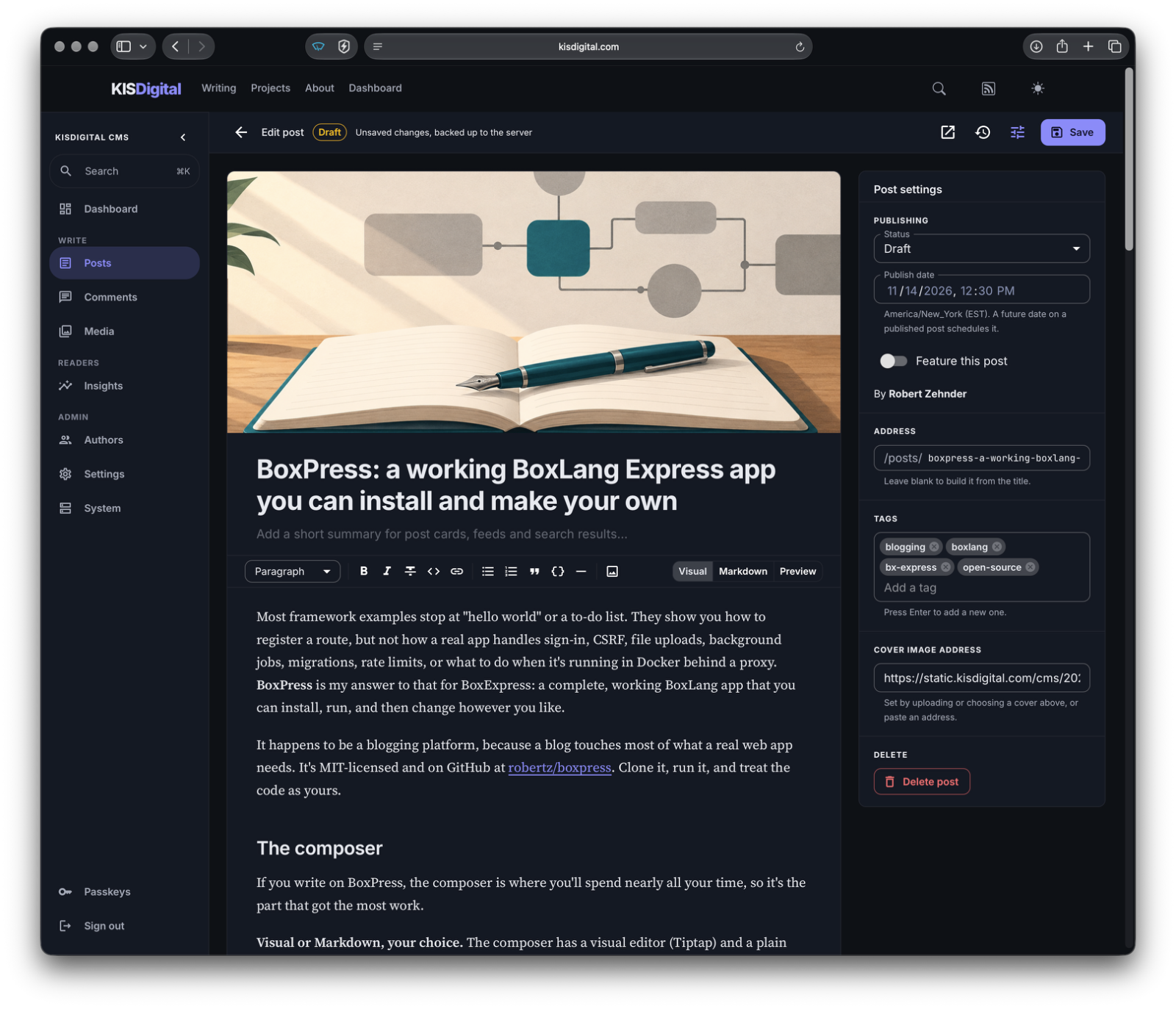
Around the body you get a title, a description with a character count, tags, a custom URL that's generated from the title until you edit it yourself, a publish date for scheduling, and a word count with reading time. The settings panel folds away when you want just the text.
This post as viewed in the composer
What else is in the box
The public site. Server-rendered .bxm templates: one narrow column, self-hosted fonts, light and dark modes, RSS, a sitemap, robots.txt, and social sharing cards. If it looks familiar, I restyled it after this site. Post bodies are rendered from Markdown when saved and then sanitized, so an author's account can't put script on the site.
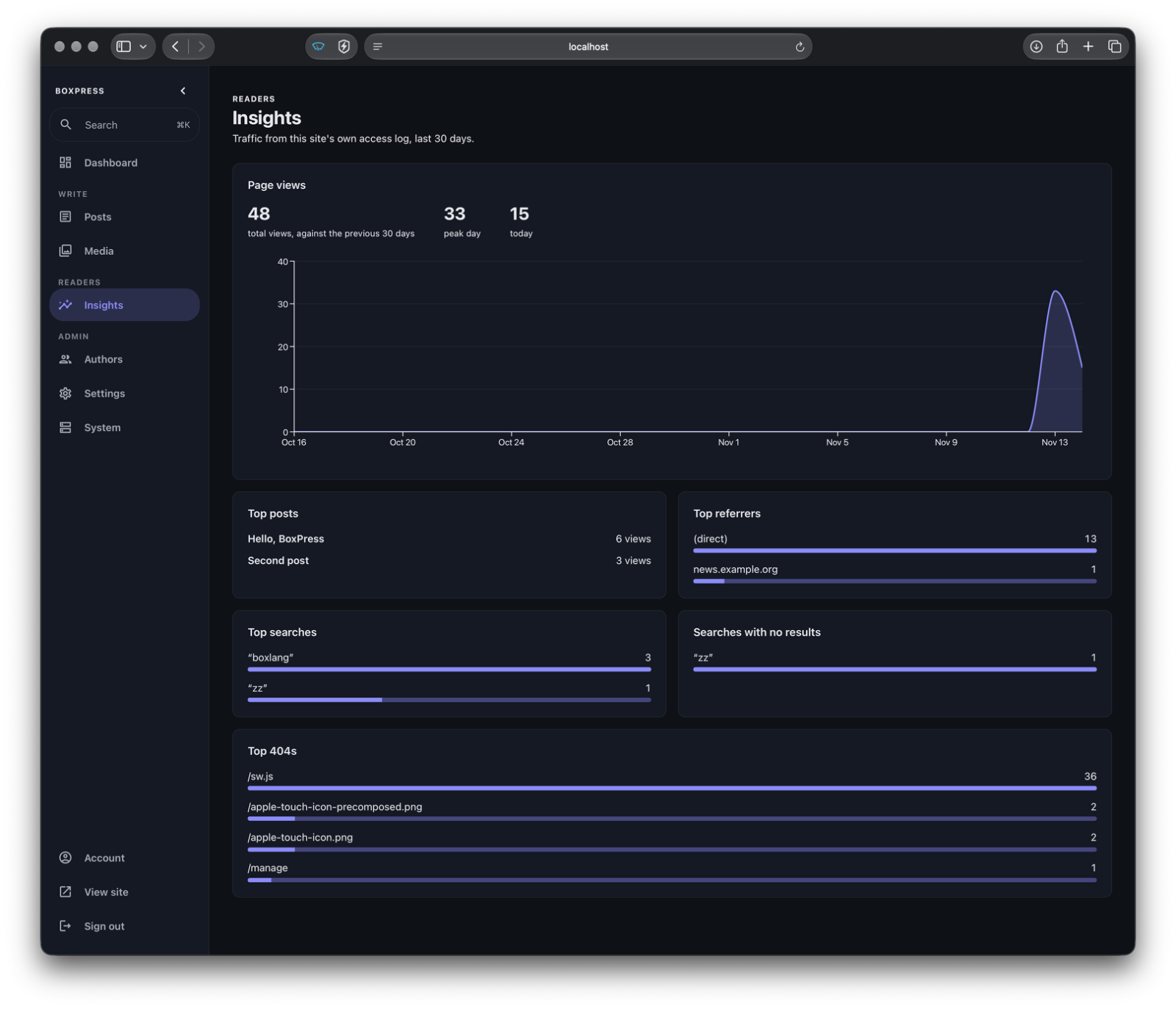
Insights. Page views, top posts, referrers, searches (including those that found nothing), and broken links, all from the site's own access log. There's no third-party script, no IP addresses are stored, and bots are flagged so they don't count.
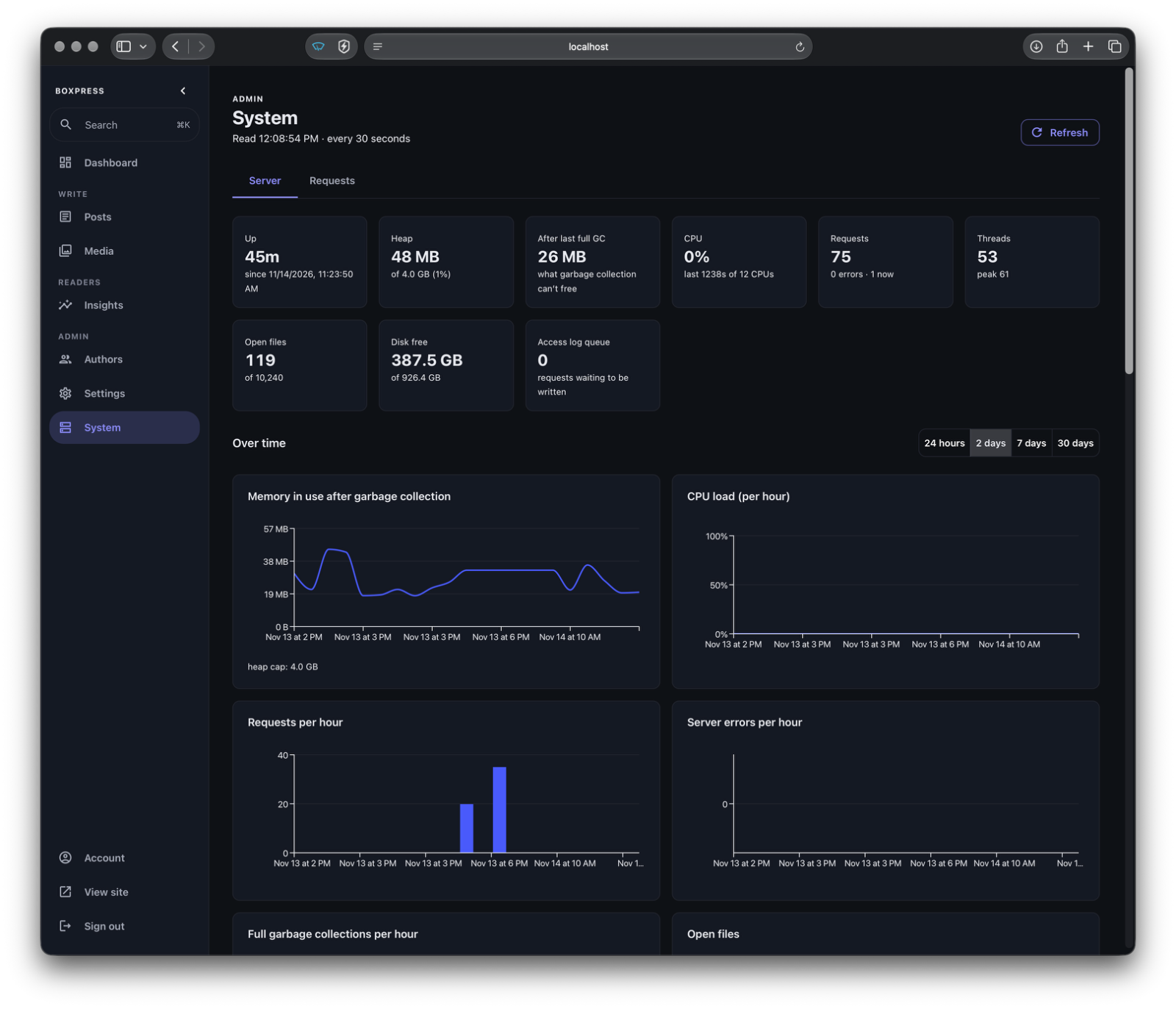
Server monitoring. Memory, CPU, garbage collection, threads, disk, per-route timings and errors, and the database pool, with hourly records charted over 90 days.
People and passkeys. Admins and authors, password or passkey sign-in, and in production an admin's powers need a session confirmed with a passkey.
Media. Location and camera details are stripped on upload, with optional WebP conversion and resizing in the browser. Files are stored on local disk or in any S3-compatible bucket.
Insights panel
System monitoring
Built to be read and changed
The point of BoxPress is that you can open any file and follow what it does. One BoxExpress process serves the API, the public pages, and the built admin. MySQL migrations are numbered SQL files that run at startup. The services live in server/services, one per concern (Posts, Revisions, Media, Sanitizer, Insights and so on), and Bootstrap.bx wires them together.
Each area of the API is a class with a static register() that takes the router and the services. Here's the whole tags API:
That var tags line matters. Closures don't inherit the enclosing function's arguments scope, so anything a handler needs is copied into a local variable first. BoxPress is full of small patterns like this that are worth copying into your own apps.
Background work uses app.schedule(): it flushes the request log every five seconds, summarizes each finished day for Insights, and prunes sessions and records server history every hour. Scheduled posts don't need a job at all. A published post with a future published_at stays hidden until that time passes.
The tests build the whole app against its own boxpress_test database and empty it before each spec. That covers sign-in and CSRF, roles, posts and scheduling, sanitizing, revisions, search, feeds, uploads, settings, and accounts, so you can change things and find out right away what you broke.
Some ways you might make it your own:
Change the templates in server/views/site/, or set the accent colour in Admin > Settings.
Add a route class next to the others and register it in Api.bx.
Add a numbered migration and a service for a new feature, such as comments or newsletters.
Add a module under web/src/admin/modules/ for a new admin section.
Running it
Locally, you need BoxLang 1.18+, Node 20.19+, and MySQL 8:
The site runs on port 8080, with the admin at /admin. For hot reload while you work on the admin, run npm run dev in web/ as well.
For production, docker-compose.yml runs the app, MySQL 8.4, and a nightly backup. Put a reverse proxy in front for HTTPS and set TRUST_PROXY_HEADER so the rate limits see real visitor addresses. The README covers the rest.
What's next
If you build something on it, or rip it apart to see how it works, I'd like to hear about it. Issues and pull requests are welcome on GitHub.
Feedhouse, a small BoxLang RSS reader, was running up to 70 full GCs an hour with its heap a quarter full. The likely cause: when direct (off-heap) buffer memory reaches -XX:MaxDirectMemorySize, the JDK calls System.gc() itself, and I had capped it at 64 MB. Raising the cap to 128 MB cut full GCs to 2-5 an hour, past the point where the spike used to begin. How I tracked it down with hourly JVM metrics and an admin GraphQL API, driven by Claude Code.
A tour of everything Feedhouse does, from the boring parts up: adding feeds, folders and keyboard shortcuts, then search, read-later, highlights and stories shown once, then filters for what you never want to see, feed health, a reading-stats table of shame, sharing, bundles and the phone app. Then the good stuff: newsletters with an address of their own and no tracking pixels, and a podcast player that keeps going while you read. No algorithm required.

No comments yet — be the first.