Everything Feedhouse Does, From the Boring Parts Up
A tour of everything Feedhouse does, from the boring parts up: adding feeds, folders and keyboard shortcuts, then search, read-later, highlights and stories shown once, then filters for what you never want to see, feed health, a reading-stats table of shame, sharing, bundles and the phone app. Then the good stuff: newsletters with an address of their own and no tracking pixels, and a podcast player that keeps going while you read. No algorithm required.
 16 min read
329 views
1 boost
16 min read
329 views
1 boost
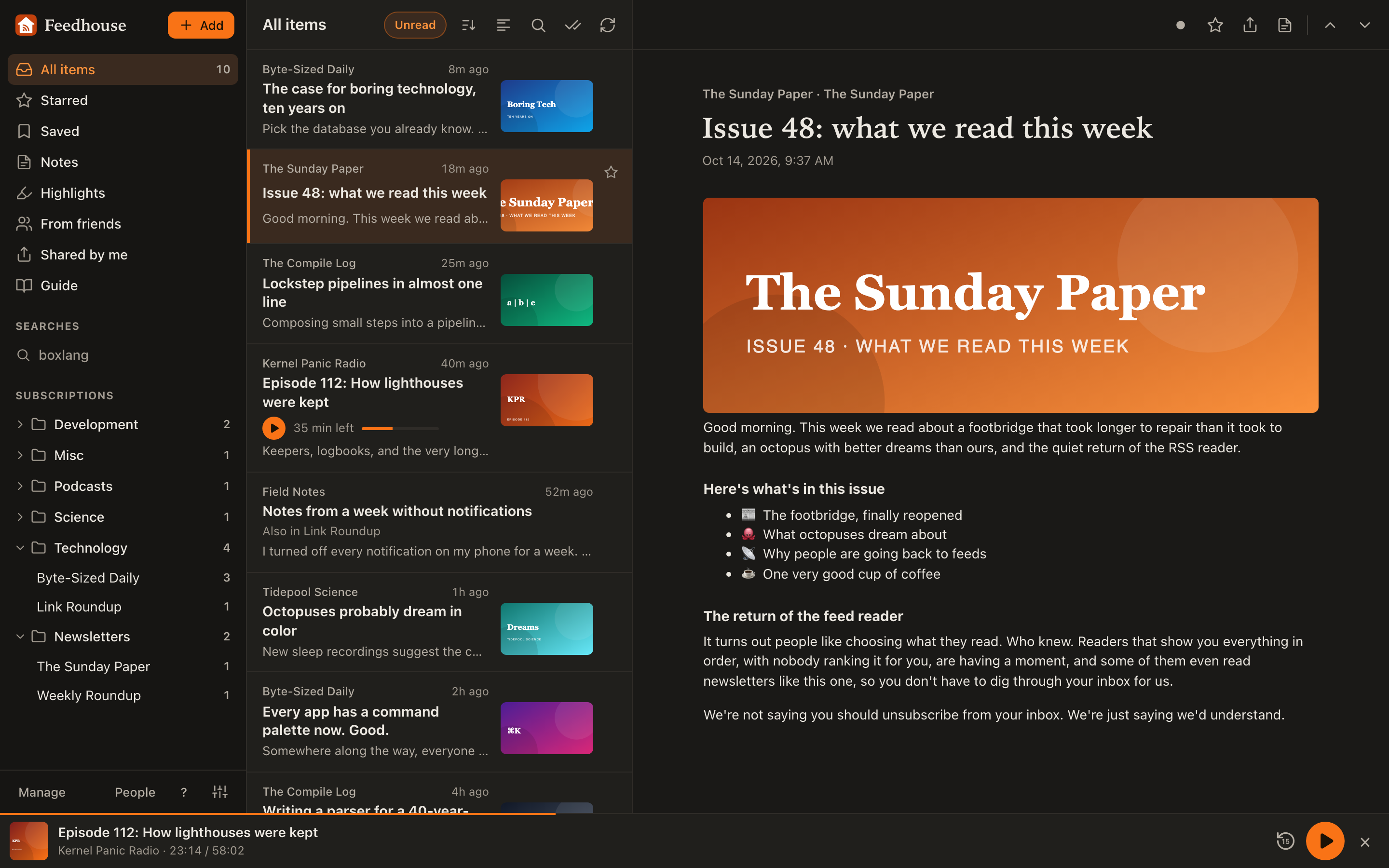
A week ago I wrote about Google Reader turning 21 and introduced Feedhouse, the feed reader I built because I'd spent years building a forum when what I really wanted was a feed reader. That post had a tidy little bullet list of features. That list is now out of date, which says something about either my productivity or my inability to leave things alone. I choose to believe it's the first one.
So here is the whole thing, every feature, starting with the parts nobody gets excited about and working up to the parts I'd actually show someone at a party, assuming I went to parties.
Signing up
Sign-ups are open. You can make an account with a username, an email and a password, or skip the password entirely and sign in with Google. You can sign in with either your username or your email, which sounds like a small thing until you've forgotten which one a site wanted. Once you're in, a short checklist in All items walks you through the first few things worth doing: adding a site, sorting feeds into folders, installing it on your phone. You can hide it once you've had enough of being told what to do. I added it because new users kept landing on an empty screen and staring at it, which is a fair reaction to an empty screen.
Adding feeds
Click Add and paste a site's address. You don't need to know where its feed lives; Feedhouse finds it. RSS and Atom cover a lot more than people remember: YouTube channels, podcasts, subreddits, GitHub releases, Mastodon and Bluesky accounts all publish feeds, so all of them work. If you're coming from another reader, import your OPML and your folders come with it, nested the way you had them. If you ever want to leave, export it again. I'd rather you stayed, but I'm not going to hold your subscriptions hostage. That was Google's move.
Folders, and keeping things tidy
Folders go three levels deep, so News, then Sports inside it, then Hockey inside that, if you're the kind of person who needs that. I am exactly that kind of person. Drag feeds and folders around the sidebar with a mouse, or press and hold on a phone for Move to folder, Move up and Move down. Each folder sorts its feeds by name, by most unread, or by your own order. You can rename any feed, and the name is yours alone; everyone else still sees what the publisher called it. Manage lists everything in one place, with checkboxes for moving a pile of feeds at once, which is the feature you don't care about until the day you import 200 feeds into the wrong folder.
Reading
Three panes: sidebar, list, article. The list shows unread items or all of them, newest or oldest first, in comfortable, compact or card views, and Feedhouse remembers your choices for each list separately. Items are marked read when you open them, or as they scroll past if you'd rather, and Mark all as read only marks what was in the list when it loaded, so anything that arrived while you were reading stays unread. When a feed runs out of unread items, a Next button takes you to the next feed or folder with something in it. It's the closest thing Feedhouse has to an algorithm, and all it does is count.
New items show up at the top as they're found without moving what you're looking at. That last part is newer than I'd like to admit. Until yesterday, if you were at the top of a list when new items arrived, every row slid down and your tap opened whatever article was now under your finger. I spent a while assuming I was just bad at tapping.
For feeds that only send a headline and a sentence, Load full article fetches the whole thing from the site, and Always for this feed does it every time. Some sites, Medium for one, answer automated requests with a CAPTCHA, which Feedhouse can't solve on principle and in practice. It tells you so instead of failing quietly, and v opens the original so you can read it there like an animal.
Keyboard shortcuts
If you grew up on Google Reader, your fingers already know these. j and k move through items, m toggles read, s stars, v opens the original, r refreshes, u switches between unread and all, o flips the order, n and p jump to the next or previous feed with unread items, / searches, Shift A marks everything read, and ? lists the rest. There are a few for the podcast player too, which I'll get to. If one-key shortcuts get in your way, voice control users especially, you can turn them off in Settings.
Settings
Text size, reading width, and a light, dark or match-your-system theme. Mark read on open, or on scroll. Your email, your password, and whether Google can sign you in. Your Mastodon server, if you want to share there. The reading preferences are kept per device, so your phone and your laptop can disagree with each other, which is more than I can say for most of my devices, which agree on everything except how to sync.
Stars, Saved, notes and highlights
Starred is the stuff you want to keep. Saved is read-later: paste any link from anywhere on the web, and Feedhouse pulls in the article so you can read it in the same place as everything else. On Android you can share a link straight to Feedhouse from other apps. You can keep a private note on any item, and nobody ever sees it but you; not your followers, not an admin, not me. Select text in an article to highlight it, with a note if you want one, and your highlights come back in the right place even when the same sentence appears twice in the article. I tested that specifically, because it's exactly the kind of thing that works fine until it doesn't. Highlights and Notes each have their own list, and highlights export as Markdown, ready for Obsidian, with block IDs so you can link straight to them.
Search
Full-text search across everything you follow and everything you've saved, read or not. Every word you type has to appear; put a phrase in quotes, a minus sign before a word to leave it out, and a star after the start of a word to match any ending, so garden* finds gardens, gardening and the occasional gardener. Search from inside a feed or folder to search just that, narrow it to the last week, month or year, and sort by best match or newest. Pin a search to the sidebar and it gets its own unread count, which turns a search into a feed about a topic. I have one for "boxlang". It's mostly me.
Every story once
When something interesting happens on the internet, it shows up in the original blog, then on Hacker News, then on Lobsters, then in two newsletters. Feedhouse notices that those are all the same link, give or take a utm_source or a trailing slash, and lists the story once, using the copy with the most actual text, with Also in and the other feeds underneath. Reading it marks every copy read, and the unread counts only count it once. A feed's own list still shows its own copy, so you can still find the Hacker News comments, which I'd mostly recommend not reading.
Sites without a feed
Some sites publish no feed at all, in 2026, as if out of spite. When you try to add one, Feedhouse says so and offers to ask an admin to make one. An admin (currently me) builds a feed from the page itself, and you're subscribed the moment it exists, in whatever folder you picked. Add shows your requests and what became of each. If I can't make one, I'll tell you why, and you can reply with somewhere else the posts are published. These page feeds are checked every couple of hours, and if the site ever gets a real feed, everyone following the page feed is moved to it automatically. Nobody has to do anything. That's my favourite amount of things to do.
Feed health
Feeds break. Sites move, publishers delete things, someone's WordPress plugin decides the feed is now a 404 page. When a feed hasn't loaded in a while, or hasn't posted anything in three months, Feedhouse says so above its list, with how long it's been and why, plus a link to the site and a quick way to unsubscribe or mute it. Failing feeds get a warning sign in the sidebar. Feedhouse keeps retrying a failing feed on its own, less often the longer it fails, and stops when the publisher has clearly removed it for good. In Manage, Needs attention shows only the feeds that are broken or have gone quiet, which is a shorter list than you'd hope.
Reading stats
Manage → Reading shows, for every feed, how many items arrived over the last 30 days, 90 days or year, and how many you actually opened and starred, sorted least read first, with Mute and Unsubscribe right there on each row. Marking a list read doesn't count as reading it. So a feed you only ever clear with Shift A sits at the top of the table with zero percent opened, quietly asking why you're still subscribed. I call it the table of shame. It only counts opens from the day I added it, so give it a few weeks before it starts judging you.
Your rules, not an algorithm
This is where Feedhouse stops just showing you things in order and starts letting you decide which things. Filters look at each new item as it arrives and hide it, mark it read or star it when it matches a word or phrase you pick, in the title, the text, the author or the link, everywhere or just in one feed or folder. Want to never see the word "sponsored" again? Done. Want every post mentioning your town starred? Done. If you're comfortable with regular expressions, you can use one of those instead, and if it's the kind of regular expression that would take MySQL until the heat death of the universe to run, Feedhouse refuses it rather than finding out the hard way. I found out the hard way.
Before you add a filter, it shows you what it would have caught in the last 30 days, so you don't accidentally hide half your subscriptions over the word "AI". Although, honestly. Each filter keeps count of what it has caught, and What it caught lists the items so you can check it's not being overzealous. Hidden items drop out of your lists and counts but still show up in search, and deleting a filter brings back everything it hid, unread. Only you see what your filters do; other people following the same feed get everything.
Each feed has its own settings too:
- Mute leaves it out of All items and its folder, and their unread counts. Its own list still has everything. Good for a firehose you only dip into.
- Notify me of new items sends a push notification when it posts. Muting wins over notifying, and anything a filter already hid doesn't count.
- Check for new items every 15 minutes, every hour, every 6 hours or once a day, instead of the usual half hour. Feeds are shared between everyone who follows them, so a feed is checked as often as its most impatient subscriber asks. I'm usually that subscriber.
People and sharing
Accounts here can follow each other. Share an item with your followers, with a note if you have something to say about it, and they'll see it under From friends. Anyone who can see a share can comment on it, in Markdown, with a badge when there's something new. You decide whether you're in the directory, whether follow requests are approved automatically, whether followers can see what you subscribe to, and whether people you follow back can see when you're online. Status is mutual: hide yours, and you don't get to see anyone else's. Seemed fair.
To share outside Feedhouse, an article's menu has Share to another site: Bluesky, Threads, X, Facebook, LinkedIn, Reddit, Hacker News and email, plus Mastodon once you've set your server in Settings. It's basically Google Reader's social layer, before Google bolted it onto Google+ and then removed it, which remains one of the more Google things Google has done.
Bundles
A bundle is a set of feeds someone else can subscribe to in one go: a reading list for a topic, a team's sources, the local news. Make one from People → Bundles, start from one of your folders if you like, and choose who can see it: your followers, anyone with the link, or everyone in the public directory. Joining a bundle puts its feeds in a folder you pick. When the owner adds a feed later, you get that one too, and leaving the bundle unsubscribes you from its feeds. If you want to follow all the ColdFusion bloggers without hunting each one down, here's a bundle for that.
On your phone
Feedhouse is a web app you can install. Open it in Safari on an iPhone and choose Add to Home Screen, or use Install app on Android, and it opens full screen like anything else on your phone. Swipe an item right to toggle it read, left to star it. Pull down to refresh. In the installed app, swipe in from the left edge to get back to the list. While you're online it downloads your next unread articles and their pictures, so a train tunnel doesn't end your reading, and anything you mark read or star while offline is sent when you're back. Notifications tell you when someone shares with you, comments or follows you, or when a feed you asked about posts something new, and the icon on your home screen shows your unread count. I resisted building native apps for a long time. I am still resisting.
Privacy
Every feed's HTML is cleaned on the server before you ever see it, and pictures load through Feedhouse instead of straight from the publisher, so the sites you read never see your IP address. That matters more than you'd think for newsletters, which I'll get to in a second. Notes are private, full stop. On feedhouse.app, Google Analytics counts which kind of page gets visited, /feed/:id and never which feed or article, and only after asking first if you're in the EU, the UK or Switzerland. You can turn it off from the landing page. There are no ads and there aren't going to be any. Old items that everyone has read and nobody kept (starred, saved, shared, highlighted or noted) are cleared out daily, so the database doesn't grow until it collapses into a black hole of unread tech news.
Newsletters
Your account has its own email address for newsletters. Copy it from Settings and use it to sign up for things, and each issue arrives in Feedhouse as an item in a feed for that sender, in a Newsletters folder, instead of in your inbox between your bills and your boss. Starring, saving, highlights, notes, filters and search all work on them like any other feed. Newsletters love tracking pixels, tiny invisible images that report back when you've opened them; since every picture loads through Feedhouse, they never see you. Many newsletters send a confirmation email first, which arrives like any other issue, so you just open it and click.
Getting out is just as easy. A newsletter's menu has Stop the emails, which opens the sender's own unsubscribe page, since removing the feed alone doesn't stop the mail. For the ones that won't take no for an answer, Block this sender drops their email from then on, and they never find out. If your address starts getting spam, New address in Settings replaces it, and the feeds you already have stay put.
Podcasts
And here's the part I'd show someone at the party. Podcast episodes have a play button right in the list, with how long they run or how much is left, so you can start one without opening it. The player sits along the bottom of the screen and keeps going while you read other things, switch feeds, or wander into Settings. Tap it for the full player, with back 15 seconds and forward 30, a scrubber, a speed from 0.8× to 2× that it remembers for each show, a sleep timer, and the episode's notes. On your phone, the lock screen and your headphones control it like any other player. With a keyboard, Shift P plays and pauses.
Feedhouse also remembers where you were in every episode, on every device. Stop halfway through on your laptop, pick up your phone, and it carries on from there; if you were offline, your place is sent when you're back. When you come back to the app, the player offers the episode you were last listening to, and Continue listening lists the rest you've started. An episode you play to the end is marked read. I'm thirty minutes into an hour-and-a-half ColdFusion podcast as I write this, which is either a testament to the player or a cry for help.
Under the hood
The server is BoxLang on BoxExpress, my Express-style framework for it, and the web app is React, backed by MySQL. Images are stored on Cloudflare R2, and newsletters come in through a Cloudflare Email Worker. There are over 440 tests, including a set that drive the real app in a real WebKit browser on an emulated iPhone, using bx-playwright. They play podcast episodes, highlight text, go offline and come back, and check that the row under your finger doesn't move when new items arrive. That last one exists because of me. Most tests exist because of me.
That's everything
That's the whole tour, at least until I add something else, which history suggests will be Thursday. Sign-ups are open at feedhouse.app. Bring your OPML. Bring your newsletters. Bring your podcast backlog. Leave the algorithm at the door.


No comments yet — be the first.